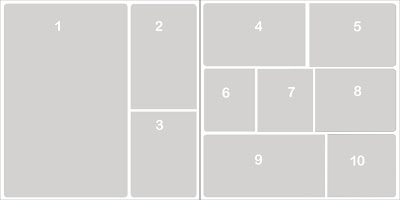
 Webajeb-Template-023
I'm just having way too much fun creating templates lately! Luckily, since I try to also create a layout using the new templates I'm also making progress (finally!) on my son's wedding album!
I've also started something new with my templates. I've added a layer in the file with numbers on each photo layer. You can see the numbers in the template above. As I've been working with the templates, especially the ones with lots of photo layers, I found having that reference makes it much easier to select the layer I want before I drag in my photo. (Because, as you know, when the correct layer is selected before dragging in the photo, the photo will land on top of that very layer, eliminating the hassle of moving the photo up or down in the layers palette.) Just be sure to hide or delete the Photo Numbers layer before printing!
I'm still also including the plus sign (+) in front of the layer name on each layer that is clippable. This makes them easy to identify and also reminds you to use that method (if your digital software program supports it) when sizing your photos to fit.
So, on to the layout I created using the template:

When you have tons of photos for an event (like a wedding!) it's great to be able to fit in lots of photo on some of the pages!
Get this template, or any of my previous ones, in my online store
here!








 Posts
Posts